




- What are Google Search Console platform properties?
- How to add an Instagram, TikTok, X or YouTube account to Search Console
- What can you measure with a platform property?
- How to track Instagram Reels in Google Search Console
- Compare social and video formats instead of guessing
- Why social content belongs in SEO reporting
- Platform properties are not a replacement for native analytics
- What to do this week
- The bigger shift: social content is now a measurable search asset
- Frequently asked questions
- Need help connecting social, search and AI visibility?
- Sources
Google Search Console platform properties let creators and marketers measure how their Instagram, TikTok, X and YouTube content performs across Google Search. Once an account is connected, you can see the queries that surface its content, along with clicks, impressions, click-through rate (CTR) and average position.
For a long time, Search Console could show how a website performed in Google Search – but it could not show how content on platforms you do not own performed. That left a major reporting gap. A YouTube Short, TikTok video, Instagram Reel or X post could be appearing in Google results and attracting visitors without showing up in your SEO reporting.
Platform properties close much of that gap. They make social and video content measurable search assets, not simply content that lives inside an app.
What are Google Search Console platform properties?
Platform properties are Search Console properties for supported social and video accounts. They help creators and publishers understand how people discover their platform content through Google’s surfaces.
At launch, supported platforms include:
- TikTok
- X
- YouTube
Each account or channel needs its own property. If you manage multiple Instagram accounts or YouTube channels, add each one separately so you can analyse its data independently.
Platform-property data is about Google discovery, not in-app performance. It can show whether a Reel appeared in Google Search and whether someone clicked it. It cannot tell you how many people saw that Reel in their Instagram feed, saved it, shared it or watched it to completion.
How to add an Instagram, TikTok, X or YouTube account to Search Console
- Open Google Search Console and select the property selector.
- Choose Add property.
- Select the relevant platform and account or channel.
- Complete Google’s verification flow.
- Wait a few days for reporting data to begin appearing.
Google periodically rechecks ownership. If the connected platform login expires or the connection is revoked, reporting can be paused until you verify again. Re-verifying restores access to the same property; you do not need to start collecting data from scratch.
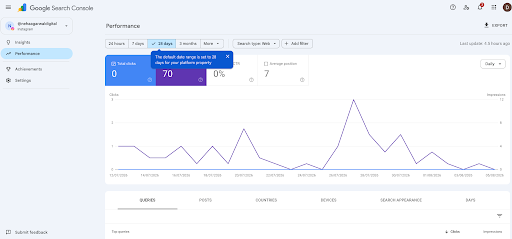
What can you measure with a platform property?
Once the account is connected, three reports are especially useful.
1. Performance report
This is the main analysis view. It shows:
- Clicks from Google
- Impressions in Google
- CTR
- Average position
- Queries that led users to the content
- Individual posts or videos receiving search visibility
- Eligible Google surfaces, such as Search and, where data is available, Discover or Google News
The Queries tab is where the most valuable insight usually sits. Do not focus only on one keyword at a time. Look for repeated themes and specific questions. Those patterns reveal what users expect your content to answer.
2. Insights report
The Insights report offers a simpler overview of traffic trends, top-performing content and the ways users are discovering your account through Google. It is useful for quick reporting conversations with social, content or leadership teams.
3. Achievements
Achievements highlights growth milestones, such as reaching a new threshold of clicks from Google Search. It is less useful for diagnosis, but helpful for spotting momentum and communicating progress.
How to track Instagram Reels in Google Search Console
To measure Instagram Reels in Google Search, add the relevant Instagram account as a platform property, then use the Performance report to filter and compare content URLs.
In many cases, you can compare:
- /p/ URLs for standard Instagram posts
- /reels/ URLs for Instagram Reels
This lets you see whether standard posts or Reels are earning more visibility in Google. The answer may differ sharply from native Instagram analytics.
For example, a Reel may earn strong reach in the app but little Google visibility, while a descriptive carousel post keeps appearing for a useful search query. Neither format has necessarily “won”; they may be serving different user behaviours. Native analytics measures what happens inside Instagram. Search Console measures the Google-search journey before someone reaches Instagram.
Use the findings to shape the next piece of content. If Google repeatedly surfaces a Reel for a how-to query, make the on-screen opening, caption and spoken context more explicit. Consider creating a detailed article, product page or long-form video that answers the same question more completely.
Compare social and video formats instead of guessing
Platform properties are particularly useful when deciding which formats deserve more production effort.
YouTube Shorts vs long-form YouTube videos
In the YouTube platform property, compare URLs containing:
- /watch for standard videos
- /shorts/ for Shorts
Review clicks, impressions, CTR, average position and query themes – not just total views. A Short might succeed as an in-app discovery format, while a longer tutorial might earn steadier search visibility because it answers a more specific question.
Instagram posts vs Reels
Compare /p/ and /reels/ URLs to understand which Instagram format appears more often for the topics you publish about. If posts consistently earn search impressions for product-led or educational searches, that is useful evidence for your social content calendar and your website content plan.
Turn search signals into content decisions
Suppose a short recipe video performs well in TikTok but rarely appears in Google. A detailed YouTube tutorial about the same recipe may continue earning Google impressions because searchers want more depth, clearer steps or more precise language.
That does not mean the TikTok failed. It means the formats are meeting different needs. Use the insight to improve the next version:
- Lead with the exact question or problem people search for.
- Make captions and descriptions specific, not generic.
- Add clear visual context early in the video.
- Create a deeper companion asset when the topic has sustained search demand.
The goal is not to turn every social post into SEO content. It is to use real search behaviour to make stronger content decisions.
Why social content belongs in SEO reporting
Social content can have a much longer search life than its life in a feed. A Reel may stop receiving a distribution push after a few days but remain discoverable in Google for a relevant query months later.
Previously, proving that value was difficult. A social team could show reach, engagement and views, while an SEO team could show website clicks and rankings – but neither report clearly showed the connection between Google discovery and platform content.
Platform properties create that missing measurement layer. They help answer practical questions such as:
- Which queries are bringing users to our Instagram or YouTube content?
- Which posts are earning non-branded visibility in Google?
- Does a topic deserve a blog post, landing page, product page or longer video?
- Are Shorts, Reels or long-form videos better suited to the search intent we want to serve?
Platform properties are not a replacement for native analytics
Keep using native reporting alongside Search Console.
| Search Console platform properties | Native platform analytics |
|---|---|
| Measures discovery on Google surfaces | Measures activity inside the platform |
| Shows clicks, impressions, CTR, position and search queries | Shows views, reach, engagement, watch time, saves and shares |
| Helps identify search intent and SEO opportunities | Helps evaluate audience response and in-app distribution |
Together, these reports offer a clearer view of the full journey: how someone found the content, what they did after finding it, and whether the topic warrants deeper investment.
What to do this week
Start small. You do not need to rebuild your reporting workflow overnight.
- Add the Instagram, TikTok, X and YouTube accounts you manage as platform properties.
- Give Search Console a few days to collect data.
- Compare formats, such as YouTube Shorts versus standard videos or Instagram posts versus Reels.
- Review the Queries tab for recurring informational and commercial themes.
- Use those themes to prioritise new articles, product pages, guides or longer videos.
- Add annotations for launches, campaigns and publishing experiments so performance changes have context later.
The bigger shift: social content is now a measurable search asset
Google Search has not been limited to traditional web pages for a long time. A search results page can include videos, social posts, forums, product listings and other formats alongside standard articles.
What has changed is the ability to measure a meaningful part of that visibility. With Google Search Console platform properties, a Reel, TikTok, YouTube Short or X post no longer has to sit outside SEO reporting as an untrackable channel. You can see when it earns visibility in Google, the searches it appears for and the opportunities it creates for deeper content.
That makes social content more than a post with a short shelf life. It becomes a discoverable, measurable part of your search strategy.
Frequently asked questions
Can Search Console track Instagram Reels?
Yes. Add the Instagram account as a Google Search Console platform property. You can then measure how eligible Instagram content, including Reels, performs on Google surfaces through clicks, impressions, CTR, average position and queries.
Does Search Console show Instagram saves, TikTok views or YouTube watch time?
No. Platform properties only report how content performs on Google. Use native analytics for in-app measures such as reach, saves, engagement, views and watch time.
Can I add multiple Instagram accounts or YouTube channels?
Yes. Each account or channel is added as a separate platform property, allowing you to report on them independently.
How long does platform-property data take to appear?
Google says that data can take a few days to appear after setup. New properties may initially show incomplete data because collection starts when the property is added.
Which platforms are supported by Search Console platform properties?
Google currently lists Instagram, TikTok, X and YouTube as supported platforms. The feature is being rolled out gradually, so it may not yet be available to every Search Console account.
Need help connecting social, search and AI visibility?
At DigiAcai, we help brands connect social content, website SEO and AI-search visibility into one practical reporting and content workflow. Get in touch with DigiAcai to build a strategy around the topics your audience is already searching for.